Another month of credit card transactions to categorize. Another reconciliation that requires matching rows across spreadsheets. Another close delayed by journal entries someone has to calculate, enter, and check.
Then the CFO asks why expenses increased, or the COO needs an explanation for a falling gross margin. Your team has to stop processing the books long enough to investigate them.
For small to medium-sized enterprises, both demands often land on the same people. Whether in a $1M or $100M revenue company, Scalingwise has helped increase efficiency in finance teams mired in spending substantial time on repetitive bookkeeping work.
Connecting AI to QuickBooks can reduce that manual workload and make financial answers easier to obtain. At Scalingwise, we use Codex and Claude alongside bookkeeping expertise to organize transactions, prepare analyses, and build repeatable workflows. Our experts embed alongside your staff to help put those improvements into practice.
The opportunity extends beyond asking better questions. It includes automating the tedious preparation that used to come before every answer.
How do you connect AI to QuickBooks?
There are two practical routes: a connector that gives a compatible AI tool access to QuickBooks, or a custom integration that uses the QuickBooks Online API. Both require an authorized connection and a workflow designed around your team’s needs.
An API lets software request information or carry out supported actions in another system. A connector packages that access into tools an application can use. For example, Intuit’s QuickBooks MCP server exposes QuickBooks functions to compatible AI clients. The available actions depend on the connector and its configuration.
A connector can simplify access to standard records and reports. A custom API workflow can support more specific tasks, such as matching payment links, combining supporting schedules, or preparing a tailored month-end report. The right choice depends on the process you want to improve.
In either case, the business workflow has four parts:
- Authorize access. Connect the appropriate QuickBooks company through Intuit’s authorization process and configure the integration for the intended work.
- Define the task. Establish the reporting period, accounts, source documents, and accounting rules. Categorizing card transactions requires different inputs from calculating a monthly accrual.
- Automate the preparation. Retrieve records, apply established mappings, compare transactions, and prepare proposed categories, journal entries, or reports. We use Codex and Claude within our work; Codex can help build the scripts that make a custom workflow repeatable.
- Review and complete. A bookkeeping expert evaluates exceptions, checks support, and confirms proposed changes before an authorized update is made.
Your staff can work from a clear task and a useful output. Scalingwise can handle the connection, bookkeeping logic, and workflow design behind it.
Six ways AI can reduce manual QuickBooks work
1. Automate the first pass of monthly expense analysis
A controller sees accounting expense increase from $5,200 to $18,600. Explaining the change manually means comparing reports, opening transactions, and assembling a summary.
An AI-assisted workflow can retrieve the relevant periods, calculate variances, and organize the underlying bills and journal entries by vendor and purpose. In this example, a $12,000 annual audit bill explains most of the $13,400 increase, leaving $1,400 for follow-up.
Once the comparison is set up, the team can reuse it during each close. Instead of rebuilding a spreadsheet every month, the controller starts with the changes that deserve attention.
Where time is saved: report assembly, variance calculations, and transaction lookups. The bookkeeper focuses on explaining the change and evaluating the accounting treatment.
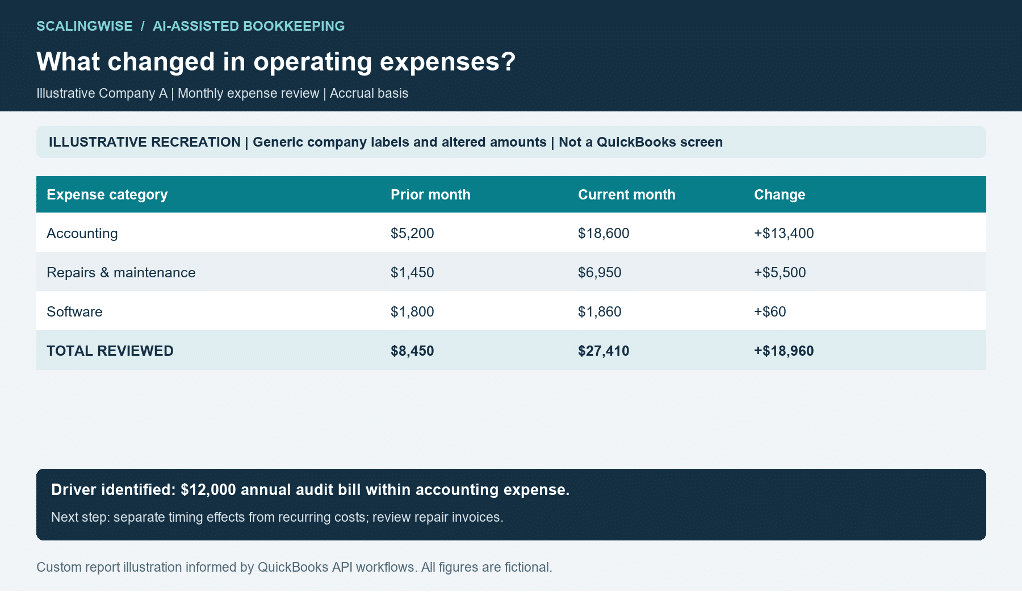
Illustrative report 1. A monthly variance becomes a specific explanation and a short follow-up list.
2. Categorize transaction-heavy bank and credit card accounts
A busy operating account or company card can generate hundreds or thousands of transactions. Reviewing each line individually consumes time, especially when vendor descriptions are inconsistent or purchases require different treatment.
We can combine approved vendor mappings and accounting rules with AI-assisted suggestions based on transaction descriptions, prior treatment, and available receipts. The workflow groups familiar items, proposes categories for review, and separates transactions that need more context.
Consider a batch of 1,200 transactions: 820 match established vendor mappings, 260 receive context-based suggestions, 95 need supporting information, and 25 are possible duplicates. These are illustrative workload groups, not a claim about an automatic approval rate.
The reviewer works through meaningful batches. Mixed-purpose purchases, unfamiliar vendors, and possible duplicates receive closer attention. Approved categories can then be applied through the appropriate supported workflow.
Where time is saved: repetitive account selection, vendor cleanup, and queue sorting. QuickBooks rules handle predictable patterns; AI assistance helps organize less consistent descriptions. Bookkeepers resolve the exceptions and maintain the account mappings.
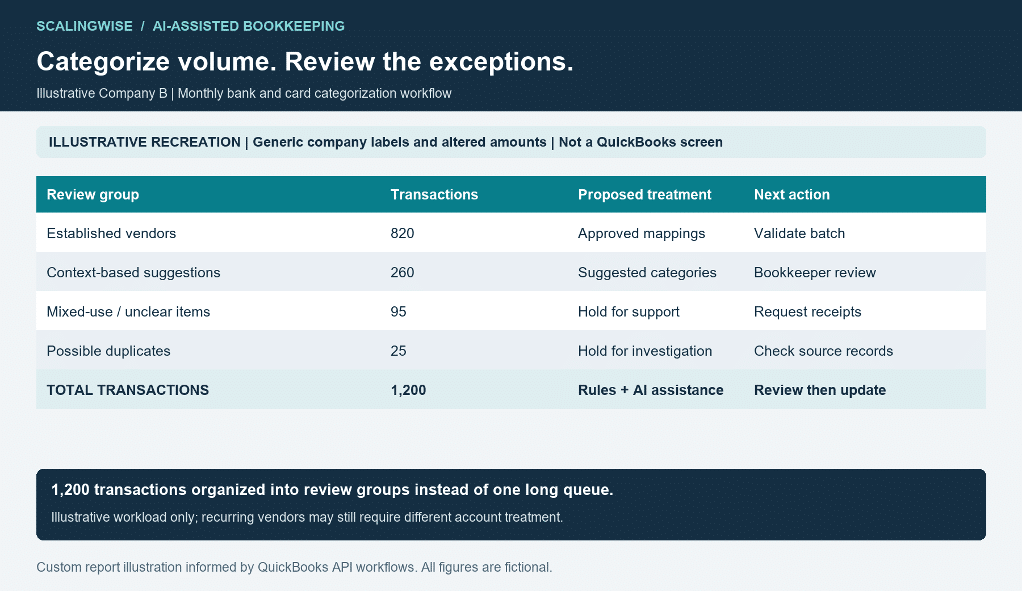
Illustrative report 2. Group routine transactions and direct bookkeeper attention to exceptions.
3. Reconcile payment records by following the transaction links
A recent vendor bill appears paid, but some attached payments are years older than the bill. Finding the explanation manually can involve opening payment after payment and recording the links in a spreadsheet.
Through the API, we can retrieve bills and payments, follow their linked transaction references, and prepare an exception schedule. In the report below, $1,250 of historical payments is linked to one current bill.
The same approach can support broader reconciliation work: matching source records to ledger entries, separating matched items from exceptions, and checking whether totals agree. A repeatable comparison reduces the need to inspect every record in the same way each month.
Older payments may represent valid advances, imported balances, or application problems. Matching identifies the records to examine; the bookkeeper uses the original obligations and payment support to determine the correct treatment.
Where time is saved: locating related transactions, matching records, and building reconciliation schedules. Staff receive a focused exception list rather than an unfiltered export.
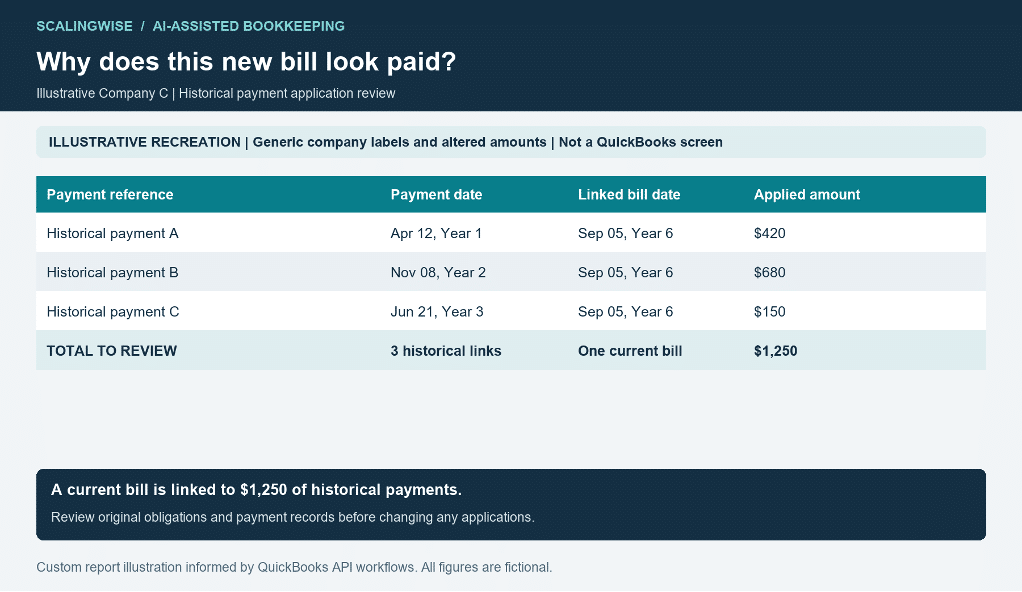
Illustrative report 3. Linked transaction records reveal exactly which historical payments need review.
How we helped an e-commerce business reconcile Shopify and QuickBooks Online
We helped an e-commerce business address a recurring bookkeeping challenge: finding and resolving discrepancies between Shopify transactions and the records in QuickBooks Online (QBO). Each payout needed to be traced to its underlying sales, refunds, and processing fees to explain where the two systems differed.
We built a reconciliation workflow that retrieves Shopify payout details and compares them with QBO deposits and their associated transactions. It matches order references and amounts, then highlights missing fees, incorrect transaction amounts, and fees assigned to the wrong order. The team can work from a focused exception list, with the supporting records available for review.
The workflow also supports correcting and syncing affected records in QBO. It can create and link missing processing fees, update supported transaction amounts, and correct fee references. After corrections, it refreshes the records and checks the payout again. Changes are recorded in a log, while unresolved or unsupported discrepancies remain visible for manual review.
Where time is saved: gathering records from two systems, matching individual transactions, identifying discrepancies, and entering supported corrections. The finance team gains a repeatable way to investigate differences and verify that the corrected records reconcile.
4. Reuse a royalty calculation instead of rebuilding it each quarter
A COO needs to confirm a quarterly royalty. The calculation depends on eligible sales, deductions, the applicable rate, and the amount already recorded.
We can retrieve sales and bill details, reconcile the sales base, and prepare a calculation using the agreed contract terms. In this illustration, $1.24 million of gross sales less $40,000 of eligible deductions produces a $1.2 million base. At an illustrative 4% rate, the expected royalty is $48,000.
The recorded bill is $43,000, leaving a $5,000 difference to investigate. The reviewer can focus on rates, deductions, timing, or bill preparation instead of rebuilding the sales schedule.
Where time is saved: collecting quarterly records, totaling eligible activity, and checking the calculation against the bill. The agreement still determines the correct rate, tiers, and deductions.
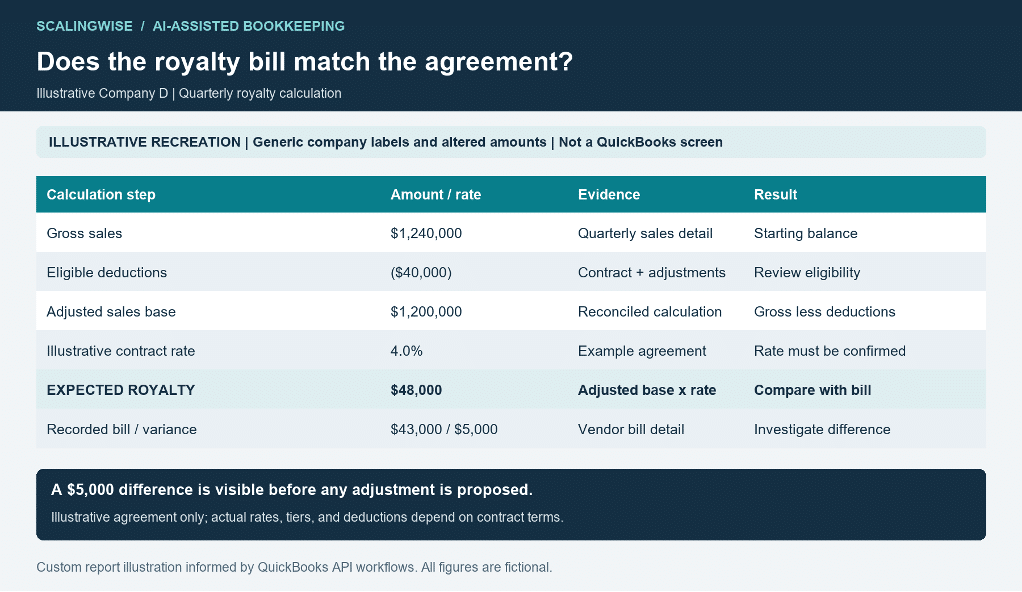
Illustrative report 4. Show the sales base, contractual assumptions, expected royalty, and recorded bill together.
5. Create monthly close journal entries from supporting schedules
Monthly close often includes prepaid expense releases, depreciation, accruals, and reclassifications. Even when the accounting is familiar, preparing and entering the same types of journals repeatedly can delay completion.
An AI-assisted workflow can bring together approved schedules and supporting records, calculate the period’s amounts, and prepare draft journal entries with account mappings and explanations. The preparation can be automated while the controller retains review of the accounting decisions.
The illustrative batch below includes a $2,400 insurance release, $3,100 of depreciation, and a $4,500 professional-fee accrual. Total debits and credits both equal $10,000. Each entry points to its supporting schedule or record.
Before posting, we can check the period, account mappings, calculations, and whether an entry has already been recorded. After approval, a supported connector or API workflow can create the entries and retrieve the posted records for verification. An accrual’s reversal treatment can also be included in the close plan.
Where time is saved: repetitive calculations, journal preparation, data entry, and posting verification. Your reviewer starts with a supported draft rather than a blank journal screen.
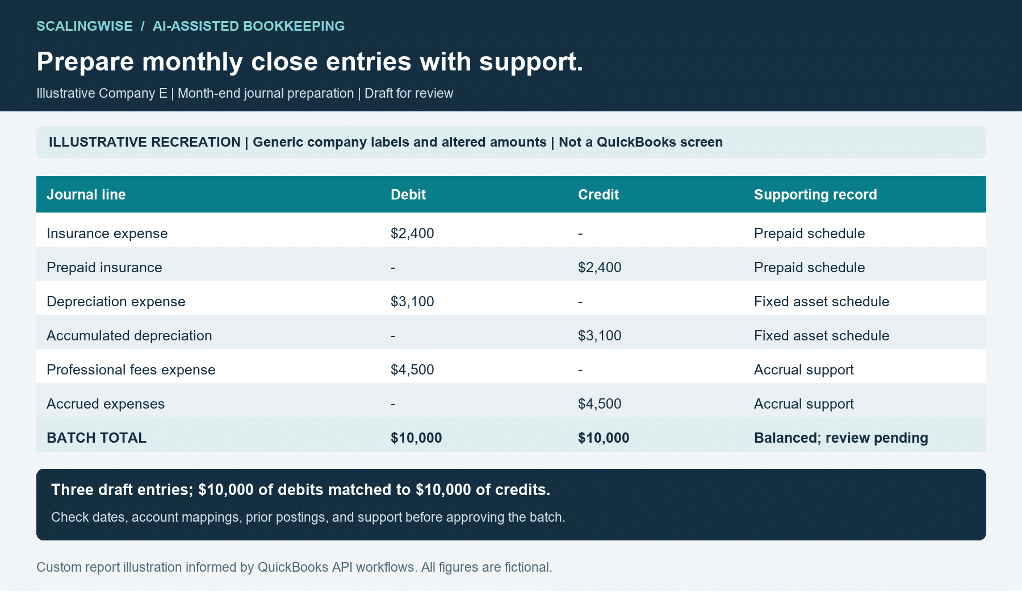
Illustrative report 5. Prepare balanced journal entries from supporting schedules for approval.
6. Trace a gross margin change to the underlying costs
A growing product business sees higher sales but weaker gross margin. The COO needs to understand whether costs increased, product mix changed, or accounting entries affected the result.
We can break cost of goods sold into transaction sources and inspect the largest adjustments. In this example, $300,000 of recorded costs includes $228,000 of invoice-related COGS, $64,000 of inventory release journals, and $8,000 of other adjustments.
Two shipment references appear across the supporting records, creating a focused overlap review. Shared references do not establish duplicate expense; inventory records and shipment support help determine the correct treatment.
Where time is saved: assembling the cost bridge, grouping transactions, and identifying related references. Leadership gets a clearer explanation before making pricing, purchasing, or staffing decisions.
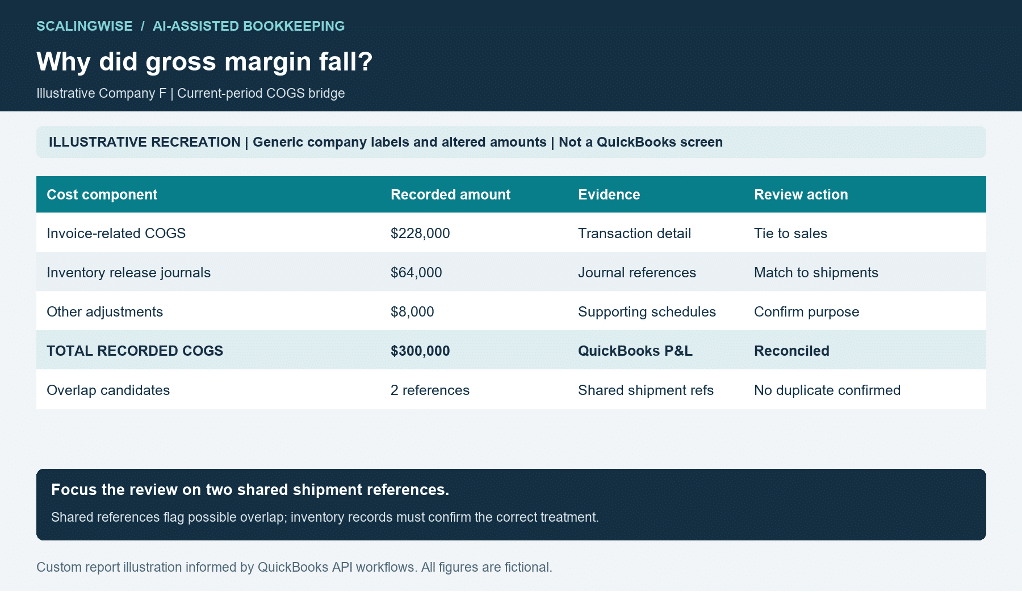
Illustrative report 6. Trace margin questions to transaction sources before drawing operational conclusions.
Move from manual processing to reviewing exceptions
The largest opportunity often lies in the work repeated every month: downloading the same reports, copying rows into spreadsheets, matching references, selecting categories, and typing journal lines.
Combining rules, scripts, connectors, and AI can substantially reduce that preparation when the inputs and review criteria are well defined. Staff spend more of their time resolving discrepancies, checking unusual transactions, and explaining results.
A practical workflow retrieves the records, applies established logic, prepares the proposed output, and highlights exceptions for review. Approved updates are then completed and checked. The next month starts with a repeatable process rather than another manual reconstruction.
The time saved depends on transaction volume, data quality, and the complexity of the accounting. Scalingwise can help identify where repetitive work is concentrated and compare the effort before and after a workflow change.
How Scalingwise embeds AI into your existing team
Your staff already know the business. They know which vendors handle multiple services, why a payment was held, and which projects drive spending. That context is essential to useful automation.
Scalingwise embeds bookkeeping experts alongside your team to turn that knowledge into repeatable workflows. Your controller sets priorities and reviews accounting decisions. Staff provide operational context. Our experts handle the bookkeeping work and help build, document, and refine the AI-assisted process.
We can start with one bottleneck: a transaction-heavy card account, a recurring reconciliation, or a close schedule that requires too much manual entry. Together, we establish the inputs, account mappings, exception criteria, review responsibilities, and expected output.
As the process improves, your team gains capacity for the next priority. The aim is to reduce the administrative burden while making the books easier to review and the results easier to explain.
Frequently asked questions about AI bookkeeping with QuickBooks
Can we use a connector instead of building a custom integration?
Yes, a compatible connector can provide access to supported QuickBooks records and actions. A custom API workflow may be useful when you need specialized matching, calculations, or reporting. Scalingwise can help select an approach around the work your staff needs to complete.
Can AI categorize all our transactions automatically?
Established mappings can handle routine patterns, and AI can suggest treatment for less consistent descriptions. Unclear purchases still need context. A useful workflow groups transactions for efficient review and routes exceptions to someone who understands your business.
Does our staff need to become programmers?
No. Your staff need to understand the task, provide context, and review the results relevant to their responsibilities. Scalingwise can handle the technical work while helping your team use the resulting workflow.
Can AI prepare and post journal entries?
An appropriately configured workflow can prepare drafts and use supported QuickBooks actions to post approved entries. The accounting basis, calculations, supporting schedules, and authorization remain part of the process. Posted records can be retrieved and checked against the approved batch.
Give your finance team more capacity with Scalingwise
Small to medium-sized enterprises need bookkeeping support that grows with transaction volume and reporting demands. Whether your team is overwhelmed by routine processing or needs help investigating complex questions, Scalingwise can work alongside your staff.
Bring us a bookkeeping process that takes too much time. We’ll discuss where expert support and AI-assisted automation can reduce the workload, improve consistency, and make financial information more useful.



0 Comments